What Is a Start Page? Start Pages, New Tabs, and Homepages
What is a start page? In the simplest terms, a start page is the first screen your browser shows you: the page that greets you when the browser launches or a new tab opens. It is where every browsing session begins, which makes it the most-seen page on the web that almost nobody thinks about. The term gets tangled up with two close relatives, the new tab page and the homepage, and it collides with a couple of products that use the name for something else entirely. This guide untangles all of it in plain language.
#What Is a Start Page?
A start page is your browser's starting point: the screen you land on before you have typed an address or clicked a link. In practice the phrase is used two ways.
The first is the browser's own definition. Safari literally names its new tab screen the "Start Page" - the grid of favorites, reading list items, and Siri suggestions you see on a Mac or iPhone. Other browsers use different labels for the same idea: Chrome calls it the new tab page, Edge fills it with news, Firefox calls it Firefox Home. Whatever the label, it is the page the browser serves you by default at the start of things.
The second meaning is older and more personal: a start page is any page you have deliberately chosen as your launching point for the web. In the early web that meant a portal with your links, headlines, and the weather. Today it usually means a customizable dashboard that replaces the default screen with widgets you picked yourself. When people search for a "start page" today, this is usually what they are after - not a definition, but a better first screen.
Both meanings point at the same job. A start page is where your browsing starts, and the only real question is whether it shows what the browser picked or what you did.
#What Is a New Tab Page?
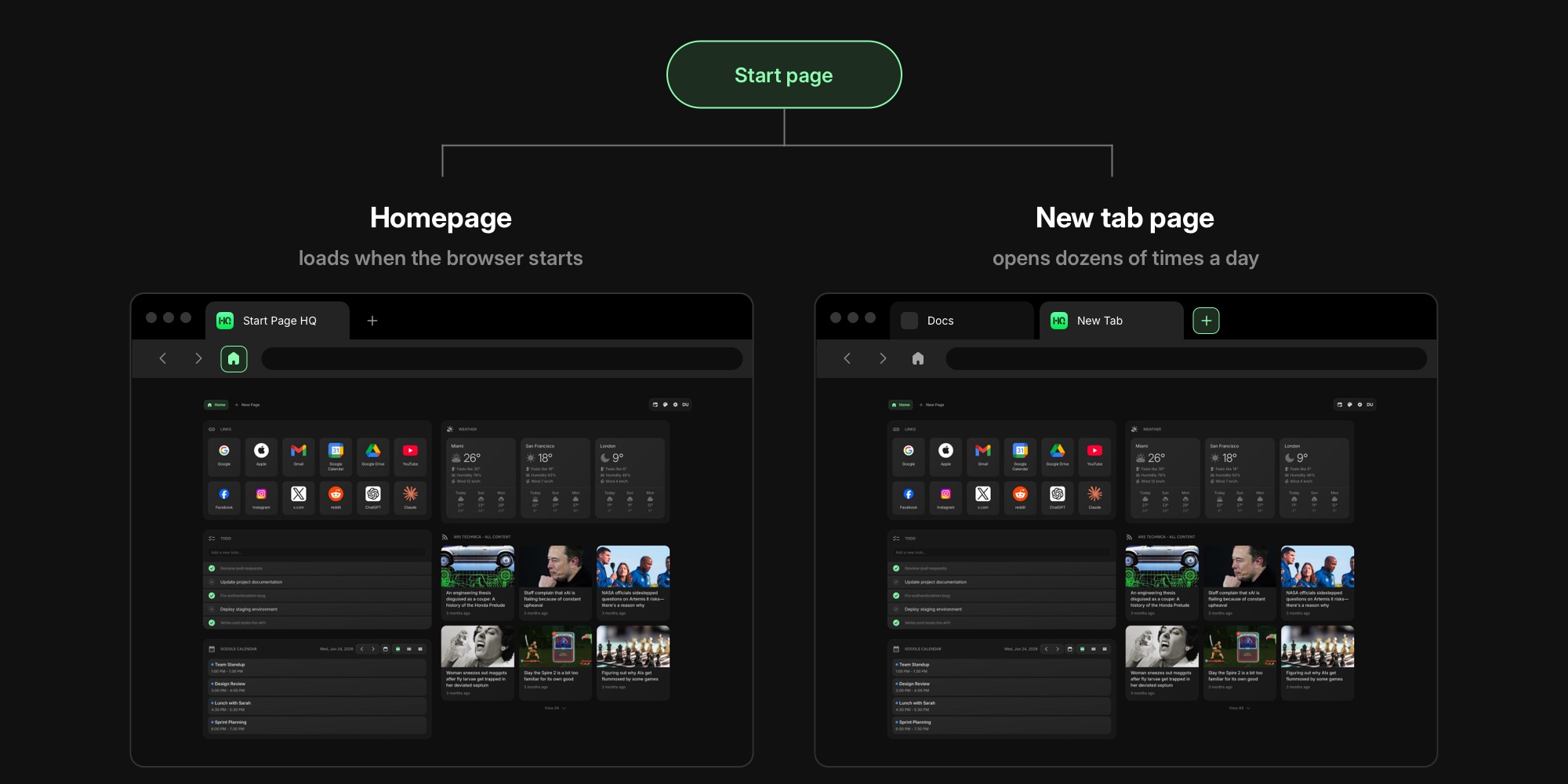
A new tab page is the specific screen that appears every time you open a new tab - the plus button, Ctrl+T on Windows, Cmd+T on a Mac. It is the modern heir to the start page, because tabs changed how people browse: the browser gets launched once a day, but a new tab opens dozens of times.
Every browser ships a default. Chrome shows a Google search box with a row of shortcut thumbnails. Edge shows a Microsoft news feed most people ask how to turn off. Firefox shows shortcuts, wallpapers, and a small set of native widgets. Safari shows its Start Page. You will also hear "speed dial" for the same screen - a term Opera coined for its grid of website thumbnails, still used by a family of extensions.
The important thing about the new tab page is that it is replaceable. Browsers let extensions take over that screen completely, which is how a default grid of thumbnails becomes a dashboard with your tasks, calendar, and feeds. Our roundup of the best new tab extensions compares the tools that do exactly that.
#Start Page vs New Tab Page vs Homepage
The three terms overlap enough that browsers themselves mix them up in their settings screens. Here is the clean version:
| Term | What it means | When you see it |
|---|---|---|
| Start page | Umbrella term for the screen where browsing starts; also Safari's own label | Browser launch and new tabs |
| New tab page | The screen that appears when you open a new tab | Every new tab, dozens of times a day |
| Homepage | The page loaded at browser startup or when you click the home button | Browser launch, home button |
The homepage is the one with a second life of its own: on the wider web, a "homepage" is also the main page of any website, the way startpagehq.com's homepage is the front door to this site. Inside browser settings, though, homepage means a URL you choose that loads at startup or on the home button. It is set with a plain setting, no extension needed, but it only appears when the browser starts.
The new tab page is different in both directions. It appears far more often, and no major browser lets you point it at an arbitrary URL with a built-in setting. Changing what a new tab shows requires an extension. That asymmetry is why the new tab page is where all the customization energy in this category goes: it is the screen you actually see all day.
If your browser opens onto something you never chose, it is worth knowing both mechanisms exist: the homepage is a setting, the new tab page is an extension.
#The Other Start Pages: A Search Engine and a Link-in-Bio Tool
Two products share the name, and if you searched "what is a start page" you may have been looking for one of them.
Startpage.com is a privacy-focused search engine from the Netherlands. It returns results from major search engines while stripping out tracking, storing no personal data about your searches. It has nothing to do with browser start pages beyond the name - though you can happily use both, by setting a private search engine as your default and a custom dashboard as your new tab.
Buffer's Start Page is a link-in-bio tool: a simple public mini-site for the link in a social media profile. Again, no relation to the screen your browser opens with.
This article is about the third thing - the browser screen - but the collision is worth naming, because all three show up in the same search results.
#A Short History of the Start Page
The personal start page is nearly as old as the web. My Yahoo let people assemble their own portal of headlines, stocks, and weather back in 1996. The idea peaked in the 2000s with iGoogle, Google's widget-based personal homepage, alongside independents like Netvibes, Protopage, and later start.me. You picked your widgets, arranged your columns, and set the page as your browser's homepage.
Then two things happened. Google retired iGoogle in 2013, orphaning millions of personal dashboards. And browsing itself moved from "launch the browser" to "open another tab," which quietly demoted the homepage and made the new tab page the screen that mattered. The category followed: tools like Momentum turned the new tab into a calm photo-and-focus screen, and a generation of widget dashboards brought the iGoogle idea back, this time living inside the new tab instead of at a homepage URL.
Protopage and start.me still serve the classic webpage-style start page well. The modern mainstream, though, is the new tab extension - the same personal dashboard, delivered on the screen you already open all day.
#What a Modern Start Page Can Do
A modern start page is less like a bookmark list and more like the home screen on your phone. With a customizable new tab dashboard you assemble the page from widgets - Start Page HQ alone ships 63+ of them - and the usual starting five looks like this:
- Links - one-click shortcuts to the places you actually go, fixed in place instead of shuffled by history. See the Links widget.
- Tasks - a todo list or Kanban board, printed on every tab you open.
- Calendar - your next meetings from Google Calendar, no app switch.
- Feeds - headlines from RSS sources you chose instead of an algorithm's picks.
- Weather - the forecast for your city, zero clicks away.
From there it grows to fit the person: developers add repo links and JSON tools, minimalists strip it back to a clock and one row of links, remote workers add world clocks for the team's time zones. Our walkthrough of turning your new tab into a personal dashboard builds a complete setup widget by widget.
#How to Change Your Start Page
The mechanics depend on which screen you mean, and we keep a step-by-step guide for every major browser:
- Homepage: a built-in setting in every browser, usually under "On startup" or "Home." No extension needed.
- New tab page: install a new tab extension and it takes over the screen automatically. The native options and the extension route are covered in our guides for Chrome, Firefox, Edge, and Safari.
- Everywhere at once: new tab extensions are normally per-browser, but a synced tool can give you the same start page in every browser and on every device.
#The First Screen of Every Session
So, what is a start page? It is the answer to a question every browser has to settle before you type anything: what should the first screen show? The default answer is a search box and some thumbnails. The better answer is a page that already knows your day - your links, your tasks, your calendar, your headlines - on the screen you will open fifty more times before dinner.
The fastest way to see the difference is to build one. The free plan gives you a real start page - 1 page, 8 widgets, sync across every browser and device, no credit card - and the live demo is there if you would rather look around without an account.